JSA, JHA & AHA Creation and Management Software

Job Safety Analysis ...is likely to result in fewer worker injuries and illnesses; safer, more effective work methods; reduced workers' compensation costs; and increased worker productivity.
- Occupational Safety and Health Administration
OSHA 3071 2002 (Revised)

Features

Hazard Scoring
Quantitative means to analyze and mitigate your most hazardous tasks
Photo Upload
Upload up to 3 photos for each worksheet step
Collaborative
Work with colleagues & clients to share knowledge and create better worksheets
Multi-Format
Download worksheets in the format that best fits your needs
Metrics
Make more informed decisions with extensive metrics about hazards and controls
Customizable
Customize hazards, controls, probability / severity & and much more

Pricing

Starting at
$ 67 / year
Volume discounts as your team grows
1st user $67
2 – 50 users $49 / ea
51 – 100 users $30 / ea
101 – 500 users $20 / ea
501 – 1,000 users $10 / ea
1,001+ users $5 / ea
Cost Calculator
1 user(s)
$67.00 total
($67.00 / user)
30-day free trial — no credit card required
Get Started Free
Try every feature free for 30 days. Make sure JSABuilder fits your team before you commit.
Start Free Trial

Testimonials

Ease of use. Easy to adjust and maintain. Very well built system.
- Joey W.
This is a great tool and is saving me untold time and money.
- Zane C.
My first time ever utilizing something like this after 26 years as a safety professional. This is amazing and very helpful. Thanks so much!!
- Ralph B.
JSABuilder was effective in the construction of documents I needed for an ongoing job that started the next day, and the fact of being able to create custom JSA's 24/7 is a big plus.
- Dennis B.
Government forms and paperwork are hard enough to fill out, this made my job soooo much easier!!!
- Rosaelia E.
This program is great. It allowed me to easily put together an AHA in a very short period. Very detailed and extremely user friendly.
- Jason D.
The steps are easy to follow and pretty straight forward. I will definitely recommend JSABuilder to any Contractor.
- Donavan E.
Program is definitely worth the money spent. With the amount of time I save using it, I can pay for the fee many times over.
- April M.
JSABuilder makes creating JSAs much easier and actually brings a few things to mind that you might not think of while creating a JSA in a hurry. Well worth the money.
- William H.

End Results

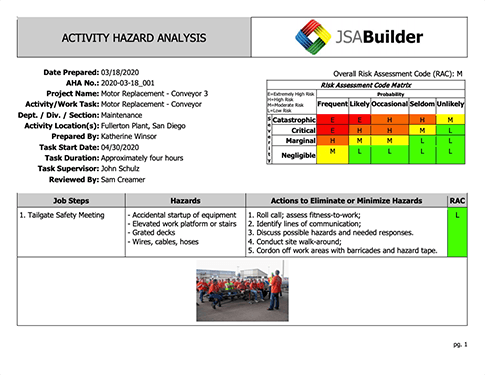
Activity Hazard Analysis Worksheet Preview
The end result is a professional, high-quality document, standardized along OSHA and USACE / EM 385-1-1 requirements, and consistent within your organization's worksheets.

Contact Us

Name
Email
Category
Message

About JSABuilder

Since 2008
Trusted by safety professionals
Tens of Thousands
JSAs created by our community
OSHA · USACE · BSEE
Regulatory compliance

JSABuilder is the easiest, most effective way to create, document and manage your Job Safety Analysis (JSA), also known as Job Hazard Analysis (JHA) and Activity Hazard Analysis (AHA). Share job safety knowledge across your organization with easy-to-answer questions, pre-programmed hazards and controls, and powerful customization options.

Access a compilation of your most common hazards and controls, as well as those identified in tens of thousands of JSAs created by our community. Unlike desktop-based job safety analysis software, JSABuilder can be accessed from anywhere, on any computer. See our pricing for more information about adding multiple users.

The Occupational Safety and Health Administration (OSHA) recognizes job safety analysis as being "a very effective means of helping reduce incidents, accidents, and injuries in the workplace." The US Army Corps of Engineers (USACE) requires Activity Hazard Analysis (AHA) per EM 385-1-1, and the Bureau of Safety and Environmental Enforcement (BSEE) requires job safety analysis under 30 CFR 250.1911.

JSABuilder Q&A

What is the difference between a JSA and an AHA or THA, etc.?
A Job Safety Analysis (JSA) and an Activity Hazard Analysis (AHA) are safety tools that enable workers to think through each aspect of a job task in order to consider the hazards involved at each step, and to determine how to mitigate those hazards. The terms, JSA and AHA, may be used interchangeably by some companies, or a company may have its own term, for instance, "Task Hazard Analysis" or "Task Safety Analysis." JSABuilder allows users the option to change the title of the form to match the terminology used by their company.
Is JSABuilder customizable?

JSABuilder is highly customizable, allowing users the option of retitling the document to fit their company's terminology (JSA, AHA, THA, or etc.), to customizing virtually every aspect of the JSA document itself.

JSABuilder provides users with both preprogrammed hazard and control measure lists to choose from, as well as the ability to add their own. We know not every job is the same, and it would be virtually impossible to provide one pre-populated list of hazards and controls that would apply to all lines of work, all job tasks, and all unique circumstances. JSABuilder offers users the opportunity to fully customize their hazard and control measures, and even "hide" those items on the list that may be irrelevant to their line of work.

JSABuilder also offers several options for customizing your job steps, in our "StepBuilder" portion of the program. Users are able to detail out the job steps, hazards, and control measures, and also insert photos, in order to make each job step as clear as possible.

For multi-user accounts, JSABuilder provides additional administrative control, allowing admin users to customize the user experience for their users, whether that's making some users standard, giving others full access to all features, or requiring review and approval by certain users before the JSA or AHA is considered complete. Admin users can even create a customized login page for their organization, with a welcome message or instructions relevant to their users.

How many JSAs can I build with one account?
With a JSABuilder subscription, you can build as many JSAs and AHAs as you would like! There is no limit to the number of JSAs or AHAs you may create, and there is no requirement to purchase more than one user.
Can I try JSABuilder before deciding to purchase?
Yes! JSABuilder offers a 30-day trial period to allow you to try out the program, familiarize yourself with the customization features, and show your supervisor or EHS manager the program for purchase approval. During the trial period, any JSA or AHA you create will include a watermark indicating "DEMO"; upon purchase of the account, the watermark will no longer show up. If you need a longer trial period, please reach out to us via email or phone!
My line of work has very unique hazards and control measures; can JSABuilder accommodate a high level of customization?
JSABuilder offers a high level of customization. We understand there is no "one size fits all" solution, and purposely designed JSABuilder to give the users as much control over the program as possible. Users are able to develop their own lists of routine hazards and control measures, as well as add in one-time hazards and controls as they work through their JSAs. If none of the pre-programmed hazards or control measures are relevant to your line or work, you have the option of "hiding" any or all of them, so that only those items that are relevant appear, and you can save time and energy by only scrolling through lists that have bearing on your job.
Help! I've never made a JSA! Where do I start?

Welcome to the world of JSAs! JSABuilder was designed with YOU in mind, to be as user friendly as possible, so that whether you are new to JSAs or are a seasoned expert, whether you are super tech savvy or feel intimidated by software programs, you can simply and logically create useful and accurate Job Safety Analyses.

JSABuilder walks you through the process of developing your JSAs. First, you will be prompted to enter some general information about the task to be performed and who will be performing it. Next, you will be prompted to think of as many potential hazards associated with that job as possible. JSABuilder provides several lists of hazards to guide your thought process; you can select any of these hazards, and also add in your own, if you think of things that are not on the list. Once you've brainstormed as many hazards as you can think of that are relevant to your job, you will be prompted to consider possible measures to mitigate or "control" those hazards. These include administrative controls, engineering controls, training, personal protective equipment (PPE), and permits. If you can't find what you're looking for in the JSABuilder option list, you can add in your own as well.

The next step in the JSA process is probably the most time consuming: detailing out the actual steps required to complete the job. JSABuilder's job description process allows you to create as many job steps as you need, from setting out gear or driving to the site, to wrapping up and demobilizing home at the end. JSABuilder also gives you the option of adding up to three photos per job step, allowing you to illustrate pertinent information for that job step, whether that's proper ergonomics, gear layout, or a close-up of a potential hazard.

With each job step, you will be able to identify which hazards and controls from your brainstormed lists apply. If you think of a new hazard or control, no problem! Just save your work, and go back to your brainstormed list to add it. Then reopen your job step and add it to the job step. Multiple job steps can include the same hazards. If you realize you forgot a step, you can easily add the new step and click and drag to rearrange those steps, to ensure everything is in order. Once you feel confident you have considered all possible hazards and job steps, click the "finish" button! Your JSA will be saved to your account and can also be downloaded to your computer and printed for use on the job.
Does JSABuilder offer any analytical tools?

JSABuilder offers a collection of analytical tools, enabling users to track which hazards and control measures are most commonly present in their JSAs, as well as those of the collective JSABuilder community. By tracking these statistics, we believe users will be able to have a better understanding of their own safety culture, and where they can look to improve, whether that's improved safety training to target a highly common hazard, or the purchase of new equipment to mitigate a hazard. We also believe that by comparing against the JSABuilder community as a whole, users may be able to learn from others as they consider the types of hazards and control measures being commonly used elsewhere, and whether these have relevance to their own jobs.

Additionally, admin users are also able to follow the number of JSAs each user on their account is developing, how often account JSAs are being created, updated, and approved, how many JSAs are for the same type of job or same department, as well as hazard scores and risk ratings. In tracking these things, we believe companies will have a better understanding of safety program buy-in and engagement by employees, as well as where employees may need further training.

Does JSABuilder offer offline consulting services?

JSABuilder offers offline health and safety consulting services in addition to our online JSABuilder, LOTOBuilder, and HASP Online tools. Whether you are a new company, a new EHS manager, or simply looking for a third party review of your safety program, JSABuilder would be happy to work with you to help establish or review your current safety program, safety program documents, or unique job safety situations. Please reach out to us via email or phone.

While our JSABuilder health and safety consultants are eager to work with you, we also want to be a resource to you. If cost is an issue, OSHA also offers a no-cost consultation program for small and medium sized businesses in the United States. OSHA's partner consultants will help you identify areas of improvement as well as a plan to address those areas, and will not result in penalties or citations. See https://www.osha.gov/consultation for more information.